No Windows 8.1 Settings were harmed in the making of this ISO. No Programs are added to Windows. No Registry Settings were modified. No Unattended Settings were added to the ISO.
Installation Indexes: Windows 8.1 (Core) x64 Windows 8.1 (Core) Single Language x64 Windows 8.1 Pro x64 Windows 8.1 ProWMC x64 Windows 8.1 Enterprise x64 ============================================ 32-bit WZT-LEAK RTM Sources: Windows_8.1_EN-US_x86.ISO Windows_8.1_Ent_EN-US_Vl_x86.ISO 9600.16384.130821-1623_x86fre_Client_SingleLanguage_EN-US-IRM_CSLA_DV5.ISO
These RTM Sources are the final Build 9600
Installation Indexes: Windows 8.1 (Core) x86 Windows 8.1 (Core) Single Language x86 Windows 8.1 Pro x86 Windows 8.1 ProWMC x86 Windows 8.1 Enterprise x86
Only legit activation methods currently work. If asked for a key during setup, use one from the instkeys.txt This is how you select the edition to install now. We had to remove the keyless ei.cfg file because it was preventing full upgrades since they added an installprep.exe file.
This will NOT fit on a DVDR Use a Blu-Ray or an 32GB+ USB flash drive.
based on the original MDSN of Windows 7, Windows 8 , Windows Server 2008, Windows Server 2012 and Windows 8.1, including 73 in a single image (! ) Edition of 64 and 86 bit editions. The system is clean. Selecting the version at the beginning of the installation. See below for details .
No Windows Settings were harmed in the making of this ISO. No Programs are added to Windows. No Registry Settings were modified. No Unattended Settings were added to the ISO.
murphy78 presents Windows Super AIO v2 x86 and x64 This has no kb files or extra features, and is intended for IT pros. These are all unmodified Indexes straight from the RTM source discs.
Installation Indexes: Windows 7 Starter / N SP1 x86/x64 Windows 7 Home Basic / N SP1 x86/x64 Windows 7 Home Premium / N SP1 x86/x64 Windows 7 Professional / N SP1 x86/x64 Windows 7 Ultimate / N SP1 x86/x64 Windows 7 Enterprise / N x86/x64 Windows Server 2008r2 SP1 x64 Standard/Core Windows Server 2008r2 SP1 x64 Enterprise/Core Windows Server 2008r2 SP1 x64 Data Center/Core Windows Server 2008r2 SP1 x64 Web/Core Windows 8 (Core) / N x86/x64 Windows 8 Pro / N x86/x64 Windows 8 Pro VL / N VL x86/x64 Windows 8 Pro with Media Center x86/x64 Windows 8 Enterprise / N x86/x64 Windows Server 2012 x64 MultiPoint Standard/Premium Windows Server 2012 x64 Standard/Core Windows Server 2012 x64 Data Center/Core Windows 8.1 (Core) x86/x64 Windows 8.1 (Core) Single Language x86/x64 Windows 8.1 Pro x86/x64 Windows 8.1 Pro with Media Center x86/x64 Windows 8.1 Enterprise x86/x64 Windows Server 2012r2 x64 HyperCore Windows Server 2012r2 x64 Essentials Windows Server 2012r2 x64 Standard/Core Windows Server 2012r2 x64 Data Center/Core Windows Server 2012r2 x64 Foundation Windows Server 2012r2 x64 Storage Workgroup/Standard
System requirements : • Processor: 1 gigahertz (GHz ) or higher. • RAM : 1 gigabyte ( GB) for the 32- bit version or 2 GB for 64- bit version. • Free hard drive space: 16 gigabytes ( GB) for the 32- bit version or 20 GB for 64- bit version. • Graphics: the graphics device Microsoft DirectX 9 with the driver WDDM. • To use the touch features require tablet or monitor that supports multi-touch . • To gain access to the Windows Store to download and run applications requires an active internet connection , and a minimum screen resolution of 1024 x 768 pixels . • To link the application requires a minimum screen resolution of 1366 x 768 pixels .
Main features: • Windows installers were not injured during the making of this image. • No programs have been added . • Register of the original left . • No automatic settings have been added to the image • There x64 UEFI Conversion Pack for those who want to create a UEFI- bootable version . • When prompted key to set the VL- versions, click the Ignore button • If desired, you can install any language pack you need , instructions
On activation : • For Windows 7, the archive contains a complete collection of ways to activate and KMSpico 8.7 • For Windows 8 in the archive is KMSpico 8.7 • For Windows 8.1 at the moment there are no activators
Tools used: imagex for ProWMC flag, renaming dism for ProWMC /set-edition, image export/compression oscdimg for ISO mastering
Notes: -EI.CFG is set to Retail channel for compatability. All non-VL will ask for key and have a skip button. ProWMC upgrade key will not work during setup, you need to restore your activation that you previously saved after installing. -Some volume versions will give false Eula. This is due to being set to the retail channel. It will not affect install or activation. -Included a UEFI conversion pack where people can make an x64-only UEFI bootable version. For USB Flash drives you need to follow the instructions included to actually install from UEFI boot. -None of these will upgrade a previously installed version of Windows with the keep settings option. This is intended for boot installs or as a wim source only.
Information about the software: Release Date : september 2013 Title : Windows Super AIO v.2 Developer : MicroSoft / murphy78 Version : v.2 ( 73 in 1) Bit depth : x64/x86 Language : English Medicine: For the present 7.8 / 8.1 for missing Size : 15.68 Gb
WINDOWS 8.1 PRO RTM , Ketidaksabaran User atau pengguna dalam uji Coba Windows 8.1 Terbaru membuat WIINDOWS 8.1 RTM ini pun DI buru, terlahir karena kontroversi , Hilangnya Tombol start, lantas membuat Pihak Microsoft akhirnya mengembalikan Tombol Start dalam Versi windows 8.1 ini, tidak hanya pengembalian Tombol Start yang di hadirkan dalam Versi 8.1 ini, ,
Beberapa Fiture seperti Lock Screen yang lebih Keren, Coustumisasi Tampilan Desktop, yang mana sobat dapat membuat Wallpaper Desktop di samakan dengan Tampilan Metro, Sebenarnya Dalam Hal yang seperti itu, Aplikasi StarDock DECOR juga sudah menyediakan, Fiture lainnya yang di persembahkan win 8.1 ini adalah Perubahan Fiture Search, aplikasi yang sobat unduh dari Toko Microsoft aka langsung di update otomatis apabila Pihak Developer memperbaharuinya. Fiture lainnya silahkan di sendiri .. :P
Windows 8.1 Versi Final Di kabarkan akan hadir di Jagad Raya dunia Teknologi Pertengahan Oktober mendatang, tepatnya Tanggal 18 OKTOBER 2013, Untuk Itu, siapkan Koneksi lebihnya.. Hahaha..
Nah, Bagi yang sekarang sobat memiliki Koneksi lebih, Dapat mencoba Versi WINDOWS 8.1 PRO RTM ( Realease To Manucfacturing )
NoTE :
RTM (Release to Manufacturing or Release to Marketing) : instilah yang biasa di gunakan untuk Kembali ke Pembuatnya. dalam arti RTM bukan barang RUSAK. RTM ini biasanaya di tunjukan sebagai perangkat lunak tertentu untuk perusahan pengembang hardware komputer seperti laptop untuk mengedarkanya dalam satu paket atau bundle dalam waktu yang telah di sepakatkan untuk menguji bahwa windows telah memenuhi kualitas yang benar benar siap di edarkan dalam bentuk distribusi RETAIL. Jadi Intinya RTM itu sudah siap untuk di edarkan secara retail, hanya di dahulukan oleh Perusahan developer komputer.
DI KUTIP DARI SOFTPEDIA
CALIFORNIA – Meskipun Microsoft telah berkali-kali meminta para penggunanya untuk menunggu sampai pertengahan Oktober mendatang untuk beralih ke Windows 8.1 versi final, akan tetapi nampaknya raksasa piranti lunak itu harus gigit jari.
Pasalnya, sistem operasi (OS) terbaru yang kini sudah dilepas dari Release to Manufacturing (RTM) ke pihak Original Equipment Manufacturer (OEM) itu telah bocor di berbagai situs maya. Sehingga, banyak yang bisa mulai mencicipi Windows 8.1 lebih awal dari yang seharusnya.
Disadur Softpedia, Kamis (29/8/2013), terkini, versi Pro Windows 8.1 x64 (64-bit) banyak beredar di dunia maya untuk diunduh. Dengan demikian, pengguna dapat menggali lebih dalam menganai pembaruan apa saja yang disematkan dari OS tersebut.
Meskipun Softies tidak menyarankan pengguna untuk mengaplikasikan versi final yang belum resmi itu, tetapi mereka sudah cukup mengecap sukses yang besar. Bagaimana tidak, euforia para pencinta Microsoft cukup terasa besar.
Hingga saat ini belum jelas apakah versi x86 (32-bit) juga akan tersedia bocorannya atau tidak. Akan tetapi, para pengguna dipastikan akan mencari sejuta cara untuk bisa menjalankan Windows 8.1 versi RTM di komputer mereka sebelum 18 Oktober mendatang.
Burning ke DVD atau Buat USB Bootabel dengan PowerIso atau Sejenisnya
Silahkan Install
Gunakan KEY di bawah ini, ( Key hanya untuk Installan )
Lihat TIAP PART, Cocokan KOde Sesuai Seperti DI bawah ini TIAP PART nya
Kalo sesuai, FIle Pasti dapat di Ekstract
DOne :)
KODE CHECK SUM untuk 32 BIT
====================
PART 1 = 2E083FAD3C2B7FEE2ECB748F8AE4B9CB PART 2 = B1B5D7983CC71DE918194AA629B05442 PART 3 = 7D0B778617C02D729F5121B9DCF524B3 PART 4 = 1E17DAAE4EC2F72D39C0345C00C0D9CE ====================
PART 1 = BDAF490071DB4A485FB9EE840FFC2453 PART 2 = AAB33CCD19117C21C0D8E07621D02FF1 PART 3 = 8F0F5D754884F2EC6D1F8AAF58F6CD78 PART 4 = 746454A82CA768A685DC9FCF00EDDBC7 PART 5 = F2761CDB9FEDCDC6CE67A2C30B944B67
Untuk sobat yang kesulitan mengaktivasi WIndows 8 atau Office 2013, bisa menggunakan Alternatif ini. Description: ————————————————————————————————— KMSAuto Pro - the automatic KMS activator for operating systems • Windows Vista, 7, 8, 8.1, Server 2008, 2008 R2, 2012 and also for • Office 2010, 2013 VL edition. It is based on KMS Server Build CZ March 14 2013 from CODYQX4 (MDL).
Operation with the program: ————————————————————————————————— Run file KMSAuto Pro.exe as Administrator and use the interface.
Additional program startup parameters (keys): ————————————————————————————————— /win=act - Run program in hidden mode, activate Windows, and close program /off=act - Run program in hidden mode, activate Office products, and close program /log=yes - Run program in hidden mode, create file "ActStatus.log", and close program /key=yes - Run program in hidden mode, set Windows key and exit. /task=yes - Run program in hidden mode, create Task Scheduler's task for activating the Windows and Office each 25 days and exit. /taskrun=yes - Run program in hidden mode, execute ask Scheduler's task for activating the Windows and Office and exit. Activation will be performed using set on tab "Settings" parameters.
————————————————————————————————— For operation of the program the .NET Framework 4.5 is required Maybe need to add the file KMSES.exe in exceptions of your Antivirus for normal operation of the program!!! Or dissable the Antivirus for the period of activation. ————————————————————————————————— Ratiborus, Evgeny972
System requirements:
Microsoft. NET Framework 4.5
Microsoft Office 2010 or Later for Office Toolkit Support
Windows Vista or Later for Windows Toolkit Support
Platform / OS: Windows Vista, 7, 8, 8.1, Server 2008, 2008 R2, 2012
Changes in 1.24: + Small changes in the interface.
MICROSOFT TOOLKIT 2.4.7 FINAL merupakan sebuah software yang mana berfungsi sebagai aktivasi WIndows dan Microsoft Office, dengan pembaharuan tentunya, yang sobat dapat coba.. bagaimana keampuhan dalam mengaktivasi windows dan office sobat khususnya yang berbasis KMS.
Requirements: Microsoft .NET Framework 4.0 or 4.5 (Not 3.5) Microsoft Office 2010 or Later for Office Toolkit Support Windows Vista or Later for Windows Toolkit Support
Changelog 2.4.7 : -Fixed crashes on Windows Vista. -Fixed Windows Version number detection for Windows Vista and Windows 8.1.
8GADGETPACK 7.0 FOR WINDOWS 8 , hmm.. mungkin kita merasa ada yang kurang ketika melihat windows 8 kita. yup. fiture gadget yang di hilangkan dari windows 7, nah. buat sobat yang merasa ingin mengembalikan fiture tersebut di windows 8, bisa gunakan aplikasi ini sobat. 8GADGETPACK 7.0 FOR WINDOWS 8
Feature of the program is a handy window c settings "8GadgetPack Tools", which contains the following options: - Disable startup programs; - Reset all the gadgets (back to how things were after the installation); - Visit the website of the program; - Leave a review; - Uninstall applications
Includes gadgets: • 7 Sidebar • Agenda • All CPU Meter • App Launcher • Calendar • Clipboarder • Chameleon Weather • Clock • Control System • CPU Meter • Currency • Custom Calendar • Digiclock • DriveInfo • Drives Monitor • Drives Meter • eBay Auction Watch • Feed Headlines • Glassy CPU Monitor • GPU Meter • Google International • Google Mail • HUD Time • MiniRadio • Multi Meter • My Weather • Network Meter • Network Monitor II • Niederschlagsradar • Picture Puzzle • Ping Monitor • POP3 Mail Checker • Power Status • Recycle Bin • Reminder • Remove Drive Safely • Slide Show • Sticky Notes Online • Stream Portal • System Monitor II • Top Five • Top Process Monitor • Unit Converter • Volume Control • Weather • WeatherCenter • Webradio Sidebar Gadget
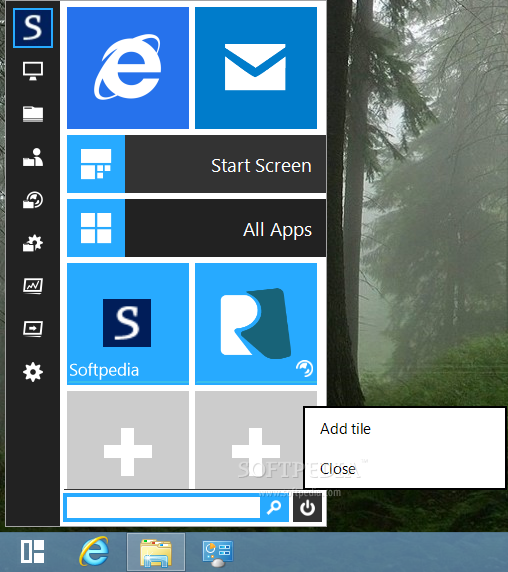
START MENU REVIVER 1.0.0.1632 FINAL merupakan sebuah tools yang dapat sobat gunakan ketika merasa asing dengan windows 8, yang notabene windows 8 tidak memiliki Tombol START, namun di windows 8.1 besok karena perdebatan, START akan di kembalikan, nah sambil nunggu itu, sobat dapat menggunakan altenatif software kecil dan gratis ini tentunya
Startdock START8 1.16 Included PATCH adalah software yang mana berfungsi membuat atau memunculkan tampilan start untuk windows 8 anda sobat, saya sendiri di buat report kalo harus cari sana cari sini, mangkanya saya install juga.. biar lebih mudah dalam mencari aplikasi .. buat anda sobat yang mungkin lebih nyaman dengan tampilan START windows terdahulu, dapat di coba untuk menggunakannya.. tertarik.. cekidot.
Features Stardock Start8:
Add Start Menu in Windows 8 Taskbar
Increase the search feature installed applications in Windows 8
Add Run option to right click menu in the desktop
Add options to Shutdown, Restart and ... The right-click menu on the desktop
Select the Start button to customize the appearance of Windows
Can be installed on Windows 8 or Windows Server 2012
Langkah Aktivasi Mohon Di perhatikan Sobat. OK
Install, StartDock start8, Lalu Jalankan CONTINUE TRIAL
DISABLE SERVICE: Jalankan TASK MANAGER, pilih TAB SERVICE, cari START8, lalu klik KANAN pilih STOP , LALU RESTART
APPLY PATCH : Copy PATCH ke " C: \ Program Files \ Stardock \ Start8"
Lalu Jalankan PATCH, RUN AS ADMINISTRATOR
Klik Tombol PATCH, Kalo ada keterangan ERROR, berarti STARTDOCK masih berjalan, Buka TASK manager nya, lalu pilih TAB PROSES, cari START8, lalu END TASK
silahkan PATCH KEMBALI,
Setelah Sukses, Aktifkan kembali SERVICE nya, dengan cara LANGKAH di Nomor 2
Lalu restart
Setelah selesai, Buka C: \ Program Files \ Stardock \ Start8, Jalankan START8CONFIG
SKIN PACK METRO FOR WINDOWS 8 , ini merupakan SKINPACK hanya untuk windows 8 sobat, dengan Efect Metro . dan mampu menjadikan tampilan windows 8 sobat lebih menarik.
Sekedar perhatian aja sobat , sebelum menginstall nya , mohon membuat SYSTEM RESTORE yang mana guna untuk mengembalikan HAL-HAL yang tidak di inginkan ketika Penginstallan selesai,
Pesenan sobat, WINDOWS 8 STAR SCREEN CUSTOMIZER, merupakan sebuah software yang di desain untuk anda pengguna windows 8 sobat, yang mana dengan ini sobat dapat mengcoustumize tampilan startscreen dengan gambar photo sendiri mungkin atau lainnya. software serupa juga sobat dapat coba yakni START DECOR
Yamisoft Windows 8 manager 1.1.2 merupakan sebuah aplikasi yang memiliki fungsi membersihkan, memperbaiki dan masih banyak lagi yang bisa dilakukan software ini untuk Windows 8..... dengan software ini akan meringankan kinerja dari PC or Laptop anda ....
KMS PICO v6 merupakan sebuah software yang dapat anda gunakan untuk mengaktifkan Windows dan juga office anda... Bagi anda yang ingin mengaktifkan windows dan juga office yang belum teractivasi silahkan gunakan KMS Pico ini... Namun dengan software ini tidak bisa aktif selamanya,, hanya bertahan 6 bulan dan setelah itu anda bisa gunakan KMS ini untuk activasi 6bulan lagi.....
Cara manual mengconvert DAri MIcrosoft Office 2013 Retal ke Volume License ada. nah.. untuk anda yang tidak ingin RIbet sobat. Salah satu jenis Fiture dari Activator WIndows 7, 8, Vista Office 2010 dan Office 2013 ini menawarkan Fiture COnvert nya. tentu anda yang merasa bingung, cocok untuk menggunakan ini. mudah ringan, dan fiture lainnya dapat anda temukan untuk mempermudah pengaktivasian windows dan office.
HEU KMS Activator - small KMS emulator to activate Windows Vista/7/8/Server 2008/2008R2/2012 and Office 2010 VL / Office 2013 VL (32 and 64 bit) without the need to connect to the Internet, you need a set. NET Framework 4.0. Works without installation and after activation, leaves no traces in the system. This tool supports 71 version of VL (Volume License).
- How to use: Click button "Avtivate Vista/7/8/Ser VL" to activate Windows. Click button "Avtivate Office 2010 VL" to activate Office 2010 VL. Click button "Avtivate Office 2013 VL" to activate Office 2013 VL. Click button "Office Retail to VL" to convert Office Retail Edition to VOL Edition.
- Parameters: /? Check parameters / w Activate Windows Vista/7/8/Server / o Activate Office 2010/2013 VOL / p Install Or Uninstall Permanent Service (Keep activation status permanently)
- Based on KMS Server Emulator, thanks to CODYQX4 and s1ave77.
Windows 8 is a great Operating System as some would argue, however, others would argue otherwise chiefly because of the removal of some core features like the Start button which has been in all Windows Operating System before Windows 8. In fact, some have described this removal as a below to the face and ripped off of their strength when using the computer.
While the Redmond company is releasing an update (Windows 8.1) that would include the important Start button, the company also debut new kind of mouse.
This mouse would have a Start button embedded in it either by the side of the Mouse or located on top as depicted in the images below. Therefore uses are no longer essentially required to click the Start button on the screen when using such Mouse.
Below are images of the new kind of Mouse. This is a welcomed development and still wondering why it took this long for such an innovative idea to be implemented.
Well, it is now implemented and it will make navigation of the Windows OS even easier.
What is your take on this hardware? Drop your comments
Stardock Fences v2.01.484 Full Version merupakan sebuah software yang dapat membantu anda merapikan layar desktop PC or Laptop anda..... Anda punya masalah di layar dekstop(berantakan)... silahkan saja langsung di download....
Tema yang satu ini merupakan sebuah tema game Call of Duty.... Bagi anda yang sering memainkan game ini pasti tau... Anda tertarik untuk menggunakan tema ini pada PC atau laptop anda agar lebih menarik... Silahkan saja langsung di Download.....
Features:
Sequential Mode: Incremental rotation of 5 logon wallpapers on every restart.
Random Mode: Randomize the logon wallpapers on every restart.
User choice: Choose the desire logon wallpaper from the preview list and use only this.
Teknoworld -Tablet Microsoft Surface, dikabarkan akan hadir lebih dulu dalam versi Wi-Fi untuk terkoneksi dengan internet. Microsoft belum menyediakan Surface versi Wi-Fi + koneksi jaringan seluler baik 3G maupun 4G.
Hal ini diungkapkan oleh dua orang sumber yang tak mau disebut namanya, seperti dikutip dari Bloomberg. Juru bicara Microsoft belum bersedia mengomentari masalah ini.
Menurut Ben Bajarin, analis dari perusahaan konsultan teknologi Creative Strategies, langkah membuat Surface versi Wi-Fi akan menekan harga jual. Namun, Bajarin memperingatkan, langkah ini akan mengurangi upaya untuk mempromosikan Surface sebagai tablet yang dapat terkoneksi dengan internet di mana dan dengan cara apapun.
"Pelanggan yang lebih tertarik untuk bekerja di setiap lokasi, tidak ingin terikat oleh Wi-Fi semata," ujar Bajarin.
Sedangkan menurut analis dari lembaga riset Gartner, Carolina Milanesi, langkah Microsoft ini masih relevan dengan kebutuhan masyarakat. Tak jadi masalah jika Surface pertama akan hadir dalam versi Wi-Fi, karena banyak orang yang memilih tablet Wi-Fi.
Pilihan tersebut biasanya diambil karena versi Wi-Fi harganya lebih murah ketimbang versi Wi-Fi + jaringan seluler. "Model Wi-Fi bukanlah batasan untuk Surface," tambah Milanesi.
Surface, yang telah diumumkan Microsoft pada pekan lalu, rencananya mulai dikapalkan pada akhir tahun 2012. Dengan membuat sistem operasi tablet dan perangkat sendiri, mengubah strategi lama perusahaan yang selama ini berfokus pada perangkat lunak (software) komputer.