Powered by Blogger.
RSS
Showing posts with label Update. Show all posts

New YouTube Update Supports Multitasking

YouTube recently updated their app for both Android and iOS to versions 5.0 and 2.0 respectively. 


This new update brings a new very important feature to the table. This new feature allows one to watch a video and in the process search for another video to watch.

This new multitasking feature is almost like having a split screen, where one screen play the present video being watched and the one below gives you the option to search for playlist or view comments to currently playing video.

Alternatively, you could move the screen of the present video below in one corner and then search for videos at the top part of the screen. At any point, you could move the presently playing video to any part of the screen or make it full screen by turning your device horizontally.

Furthermore, when your search results are returned, you can click on the "play all" button to play all the videos in the search result. Isn't this awesome?

YouTube user experience is getting better for every update released and Android and iOS users are really loving it. However, Windows Phone users won't have this same experience as there is still issues between Google and Microsoft that is making Google block Windows Phone devices from enjoying the latest YouTube experience.

You can download or update your YouTube app from the Google Play Store and Apple App Store as needed by your device.

  • Digg
  • Del.icio.us
  • StumbleUpon
  • Reddit
  • RSS

Whatsapp Messenger for BlackBerry 10 Updated

The popular cross platform Instant social messaging app Whatsapp for BlackBerry 10 just got an update.


Various updates have been rolled out by Whatsapp over these past few months.

This could be due to the announcement by BlackBerry to make BlackBerry Messenger a cross platform app to run on Android and iOS. 

Of course, if BBM goes cross platform, Whatsapp usage will diminish significantly . 
In other to stay useful and not lack any feature that the BlackBerry might have, Whatsapp have decided to release various recent updates that would give users better experience and more stability.

The latest Whatsapp update to BlackBerry 10 comes with bugs fixes, enhancements and including the following:

1. Fixes and Improvements to voice message

2. Emoji input support for Messages

3. Default maps app opening when received.

4. Push notifications fixes

5. Media auto download settings

As usual, this update can be downloaded from the BlackBerry World.

Source: BlackBerryOS

  • Digg
  • Del.icio.us
  • StumbleUpon
  • Reddit
  • RSS

Samsung GALAXY S4 Update XXUBMGA erhältlich

Samsung, Samsung Galaxy S4, Galaxy S4, Samsung S4, Update, XXUBMGAAb sofort gibt es das Samsung GALAXY S4 Stabilitätsupdate XXUBMGA in Deutschland. Das Update für das Samsung GALAXY S4 ist derzeit nur für die freien Geräte verfügbar, in den nächsten Tagen sollte sich dies ändern und das Update für alle Samsung GALAXY S4 verfügbar sein. Nach der Installation des rund 50MB großen Samsung GALAXY S4 Update gibt es augenscheinlich keine Veränderungen, User berichten aber davon, dass das Samsung GALAXY S4 jetzt noch einmal flüssiger läuft.
Read more »

  • Digg
  • Del.icio.us
  • StumbleUpon
  • Reddit
  • RSS

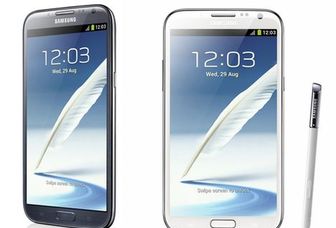
Samsung GALAXY Note 2: Direktes Android 4.3 Update bestätigt

Android 4.3, Android 4.3 Jelly Bean, Galaxy Note 2, Note 2, Samsung, Samsung Galaxy Note 2, Samsung Note 2, UpdateIn der letzten Woche tauchte ein Gerücht auf, dass für das Samsung GALAXY Note 2 es ein direktes Android 4.3 Update geben wird. Samsung überspringt damit das Android 4.2.2 Update für das GALAXY Note 2. Und auch für das S2 von Samsung wurde ein solches Update erwähnt. Doch was ist dran an einem direkten Samsung GALAXY Note 2 Android 4.3 Update? Anscheinend wohl sehr viel, denn nun hat der australische Provider Telstra bestätigt, dass das GALAXY Note 2 Android 4.2.2 Update ausfällt und es ein direktes Android 4.3 Update geben wird.
Read more »

  • Digg
  • Del.icio.us
  • StumbleUpon
  • Reddit
  • RSS

HTC One S Android 4.2.2 Update: Nun wieder doch?

Android 4.2.2, HTC, HTC One S, One S, UpdateIst das ein hin und her mit dem HTC One S Android 4.2.2 Update! Eines der teuersten Smartphone-Modelle des vergangenen Jahres, immerhin kostete das HTC One S damals EUR 500, soll kein Android 4.2.2 Update bekommen. Unverständlich, immerhin ist das HTC One S von den technischen Spezifikationen durchaus in der Lage, Android 4.2.2 ohne Probleme zu bewältigen. Dementsprechend groß war die Empörung der HTC One S User, als es hier, dass es kein Android 4.2.2 Update bekommen würde.
Read more »

  • Digg
  • Del.icio.us
  • StumbleUpon
  • Reddit
  • RSS

Samsung GALAXY Note 8.0 Android 4.2.2 Update XXCMG2 geleakt [Download]

Auf dem Mobile World Congress im Februar diesen Jahres stellte Samsung offiziell seine neue Tablet Reihe Samsung GALAXY Note 8.0 vor. Zum Release des GALAXY Note 8.0 war dieses Gerät noch mit Android 4.1.2 unterwegs. Doch nun, ein knappes halbes Jahr später, ist das Samsung GALAXY Note 8.0 Android 4.2.2 Update nicht mehr weit, wie der nun aufgetauchte Leak beweist. Das Update ist zwar noch nicht offiziell, kann aber trotzdem schon genutzt werden.
Read more »

  • Digg
  • Del.icio.us
  • StumbleUpon
  • Reddit
  • RSS

HTC One Android 4.2.2 Update in Deutschland gestartet

Es ist endlich soweit, dass HTC One Android 4.2.2 Update ist nun auch in Deutschland gestartet. Nachdem es ja schon in den vergangenen Tagen in Taiwan, Frankreich und auch in Großbritannien erhältlich war, ist nun das HTC One Update auf Android 4.2.2 endlich auch in Deutschland angekommen. Seite heute morgen haben die HTC One User die Möglichkeit, ihr Smartphone auf Android 4.2.2 zu updaten. Lange hat es gedauert, aber was lange währt wird endlich gut!
Read more »

  • Digg
  • Del.icio.us
  • StumbleUpon
  • Reddit
  • RSS

HTC One X Android 4.2.2 Update im August

Es gibt gute Nachrichten für alles User des HTC One X. Denn wie nun bekannt wurde, steht im nächsten Monat das HTC One X Android 4.2.2 Update an. das heißt also, dass nun endlich nach langem Warten die User des HTC One X ebenfalls mit der neuesten Android Version versorgt werden. In Taiwan scheint man also begriffen zu haben, dass eine ordentliche Update-Politik ebenfalls sehr wichtig ist. Viele User hatten bestimmt nicht mehr mit dem HTC One X Update auf Android 4.2.2 gerechnet.
Read more »

  • Digg
  • Del.icio.us
  • StumbleUpon
  • Reddit
  • RSS

HTC One Android 4.2.2 Update in Großbritannien gestartet

Nun ist das HTC One 4.2.2 Update auch in Großbritannien gestartet. Bereits vor knapp einer Woche war bereits das HTC One Android 4.2.2 Update in Taiwan gestartet, kurz danach wurde das Update ja auch in Frankreich ausgerollt. Noch macht das Android 4.2.2 Update um uns in Deutschland einen Bogen, es kann aber nicht mehr lange dauern, bis es endlich auch bei uns starten wird. Denn nun ist es in einem weiteren Land in Europa, nämlich in Großbritannien, verfügbar.

Bereits vor ein paar Tagen rollte das HTC One Android 4.2 Update in Taiwan aus, danach folgte dann auch bereits Frankreich. Und nun eben ist Android 4.2.2 auch in Großbritannien angekommen. Das Update ist satte 417MB groß, es wird also geraten, das HTC One 4.2.2 Update im WLAN auszuführen. Einige User in GB berichteten auch, dass vor dem eigentlichen Update noch einmal erst ein Bugfix installiert werden musste, bevor das eigentliche HTC One Update ausgerollt wird.
Read more »

  • Digg
  • Del.icio.us
  • StumbleUpon
  • Reddit
  • RSS

HTC One Android 4.2.2 Update Hands-On [Video]

Heute haben wird das HTC One 4.2.2 Update im Hands-On Video. Nachdem das HTC One Android 4.2 Update ja bereits in Frankreich angekommen ist, kann es eigentlich auch nicht mehr lange dauern, bis die deutschen User es bekommen. Um euch ein wenig auf das Android 4.2 Update für das HTC One einzustimmen, haben die Jungs von BestBoyz ein Hands-On Video des HTC One Android 4.2 Update gemacht.

Lange kann es nicht mehr dauern, bis auch hierzulande das HTC One Android 4.2 Update endlich ausgerollt wird. Bei unserem Nachbarn Frankreich ist es am Donnerstag eingetroffen. Erfahrungsgemäß dürfte in den nächsten Tagen auch bei uns die große HTC One 4.2.2 Welle anrollen. Doch was bringt uns dieses Update nun genau? Diese Frage soll uns das von den Jungs von BestBoyz gedrehte HTC One Android 4.2.2 Video beantworten.
Read more »

  • Digg
  • Del.icio.us
  • StumbleUpon
  • Reddit
  • RSS

HTC One Android 4.2.2 Update in Frankreich gestartet

Das HTC One Android 4.2.2 Update kommt nun auch in Europa an. Nachdem das HTC One Android 4.2.2 Update ja bereits vor 2 Tagen in Taiwan, dem Mutterland von HTC gestartet war, geht es nun also auch in Europa los. Erste offizielle Erfolgsmeldungen gibt es bereits aus unseren Nachbarland Frankreich, dort ist Android 4.2.2 für das HTC One nun auch endlich offiziell verfügbar.

Als vor ein paar Tagen endlich das HTC One Android 4.2 Update in Taiwan ausgerollt wurde, sagte ich ja bereits, dass das Update nicht lange auf sich warten lassen würde, bis es auch hier ankommen würde. Noch ist es zwar nicht bei uns in Deutschland ausgerollt, aber bei unserem Nachbar Frankreich ist es seit heute soweit. Dort ist das HTC One Android 4.2 Update mit der Versionsnummer 2.24.40.1.1 ab sofort inklusive HTC Sense 5.0 erhältlich.
Read more »

  • Digg
  • Del.icio.us
  • StumbleUpon
  • Reddit
  • RSS

How To Make Gevey on iOS 6.1 iPhone 4 Work Flawlessly

Updated:

I decided to upgrade an iPhone 4 with baseband 04.10.01 running iOS 5.1.1. The device was hacktivated and unlocked using Gevey.
After 30 minutes I successfully landed on iOS 6.1 baseband 04.10.01 and still unlocked with Gevey sim. Ultrasn0w 1.2.8 couldnt download because it was not compatible with my iOS 6.1 which is strange.
Through out the whole process, both Gevey and SIM remained in the phone.
Here are my steps in a easy fashion and i Hope you find it useful.
This post was published in February before iOS 6.1.3 was launched. If you want to install iOS 6.1 now, you will need SHSH blobs

NEEDED ITEMS
1. Sn0wbreeze 2.9.9
2. iOS 6.1  - 6.1.2 IPSW
3. Internet connection
4. Redsn0w 0.9.15b3
5. Ultrasn0w 1.2.7 and Mobile Substrate
6. iTools or iFunbox or iExplorer


NOTE 1: This post does not apply to those that want to upgrade to iOS 6.1.3
NOTE 2: If you want to update to the IPSW in this post as of now (1/March /2013), you will need SHSH blobs
NOTE 3: To learn more about SHSH blobs, click here

Step 1
Back-up your device with iTunes. Also, make sure all your apps are transferred into your iTunes

Step 2
Download iOS 6.1 for your device here. Please make sure you select the right one as there are 3 kinds of IPSW for iPhone 4 iOS 6.1 with regards to the model (written at the lower back of the phone)
If your model is A1332 then you will download iPhone 4 (GSM iPhone3,1)
if your model is NOT A1332 and NOT A1349 (CDMA) then you will download iPhone 4 (GSM iPhone3,2) iOS 6.1 version.

Step 3
Download Sn0wbreeze 2.9.9 here.

Step 4
Create a custom firmware with Sn0wbreeze to avoid your baseband upgrade. To achieve this:
  • launch and extract the previously downloaded Sn0wbreeze on your desktop.
  • Click OK when it opens, click on the blue arrow and then select your newly downloaded iOS IPSW
  • Sn0wbreeze will identify this and then you click on the blue arrow again.
  • Select 'Simple mode'. You will be asked if you want to activate. Click yes.
  • Sn0wbreeze will begin creating the modified IPSW and will be saved on desktop as Sn0wbreeze.xxxxx when done.
Step 5
Put your device in Pwnd DFU mode. by following the instructions given to you by Sn0wbreeze.
If you have a broken Home key, use Redsn0w to enter Pwn DFU mode. follow this tip
  • launch Redsn0w (latest verion)
  • Click Extras, and then click Even more, finally click on DFU IPSW
  • Click OK and then select the first ORIGINAL IPSW you downloaded, NOT the Sn0wbreeze version.
  • Once you have done, Redsn0w will create a new IPSW named as ENTER_DFU_iPhone3,1_6.1_10B144_Restore
  • Now connect your phone to your computer and let iTunes detect it. Click on phone and you will be taken to the summary page. Hold down the Shift button on your computer and click on Restore.
  • Select  'ENTER_DFU_iPhone3,1_6.1_10B144_Restore' that Redsn0w created for you.
  • iTunes would try to restore to that modified IPSW, it will even show progress bar, show the iTunes logo at a point. Don't panic. After a while, it will enter DFU mode.
  • You can confirm the DFU mode with Redsn0w

********
NB: To avoid error 1600 when doing the main restore, launch Sn0wbreeze and then click on iReb at the top-left and run it. You would be asked if you want to run for Apple TV 2. Click no and then click 'start' at the bottom. Your device will enter Pwnd DFU mode.

Step 6
iTunes will immediately detect your device in restore mode. Do the Shift + Restore again and then select the IPSW that Sn0wbreeze created for you.

Step7
iTunes will restore to it successfully and you will be in iOS 6.1 with preserved baseband. Phone will reboot and Evasi0n untethered jailbreak will kick in. Don't touch your device while its happening.
When its done, set up your device and Don't enable Location Services. Check your baseband

Step8
If you have a broken home key, use Assistive Touch for your Home key use.
Launch Cydia and let it download the necessary packages and then exit.

********
Most people are not experiencing issue with Ultrasn0w 1.2.8. However, if you have issues with it and prefer the 1.2.7 version, use the steps below

Step 9
Download iTools and Ultrasn0w 1.2.7 from here and extract to your desktop. Connect your device to your computer and launch iTools.
iTools will detect your device. Click on FileSystem and then type in the address at the top /var/root/Media/Cydia/AutoInstall/as seen in the image.


Step 10
Click on Upload>file and then select the two files you downloaded (ultrasn0w 1.2.7 and mobile substrate)

Step 11
Reboot  your device twice and then you will see your network bars showing up.

After all done, you should be in iOS 6.1 with the same baseband as before and unlocked with Gevey sim.

  • Digg
  • Del.icio.us
  • StumbleUpon
  • Reddit
  • RSS

Fix "No Service" Problem After Ultrasn0w Update & Evasi0n Jailbreak

Evasi0n untethered jailbreak of iOS 6 is still one of the best things that have happened in the jailbreak scene since iOS 5.1.1 jailbreak.
While many have quickly jumped and grabbed on the oppurtunity to untether jailbreak their devices before Apple patches again, some have encountered many issues with the jailbroken device.
One is the issue of Cydia shrinking in size while some have the Weather app problem although these abnormalities have been fixed with new release of Evasi0n.

Just today, I tried to untether jailbreak an already Semi-jailbroken iPhone 3GS on iOS 6.0.1 new bootrom, baseband 5.13.04 (downgraded from 06.15.00).
Evasi0n 1.1 noticed that it was jail-broken and advised that I install the untethered jailbreak via Cydia.

I fired up Cydia, allow it to download packages, and then install Evasi0n untethered jailbreak files.
I was asked to upgrade some already installed programs. I Installed other packages including upgrading Ultrasn0w 1.2.7 to 1.2.8. Immediately Ultrasn0w 1.2.7 got upgraded, network bars disappeared and "No Service" was displayed. When you power on your device, Evasi0n will do some work on your device before it boots into the main screen. I was patient and allowed it to complete its untethered jailbreak - and still "No Service"
This network bar issue should only happen when I power on the device without booting tethered.

If you ended up like I described above, this fix should get you back.

Step 1
Launch Cydia and go to Manage>Packages>Ultrasn0w. Click on Modify and then Remove
Also Remove Ultrasn0w fixer in like manner if you have it installed

Step 2.
Since you can't get Ultrasn0w 1.2.7 anymore from Cydia, you will need to download it manually and Install. To do that, click here to download Ultrasn0w 1.2.7. extract to a folder on your desktop when download complete.

Step 3
Download iTool or iFunbox or DiskAid. For this tutorial, i am using iTools.
  • Plug in your device and launch iTools
  • Click FileSystem at the left side of the screen
  • at the top of the screen you will see a search bar, type this into it /var/root/Media/Cydia/AutoInstall
  • A blank page shows up. Click on Upload>file
  • Now select the Ultrasn0w files you deleted and enter. Both files will show up in the empty space
iTools
Step 4
Switch Off and On your device twice. After that your network bars should be up again.
If not, you can go download Ultrasn0w fixer 6.0.1 if you find it.

I hope you do find this tutorial useful. 

  • Digg
  • Del.icio.us
  • StumbleUpon
  • Reddit
  • RSS

How To Update Your Blackberry OS Simplified

How to update your blackberry OS
One common task that smartphone owners would always like to do issue updating of new operating system for their devices.
Blackberry device owners can update their device by following the step by step guide below. Please make sure you back up your device before doing this.

Needed Items
1. Internet Connection
2. A computer
3. Blackberry Desktop Manager software installed on the computer
4. Connection cable
5. New operating system higher than the one installed on your device.

Assuming you have all needed items, proceed as detailed below.
Step 1
Download the blackberry desktop manager onto your computer and install it. Once installed, launch it
Step 2
Plug in your device into the computer and let it install the drivers needed for your desktop manager to identify your phone.

Step 3
Download the new Operating System you want on your phone to the computer and install it.

Step 4
Once you have installed the new OS into your computer, go to this folder: local disk C:/program files/Common files/Research In Motion/App Loader
Once in this folder, delete the file Vendor.xml file completely from your computer and recycle bin.

Step 5
Once it's deleted, plug in your phone into the computer again. Once plugged in, you will be notified of an OS update. Click Update now for the update process to begin.
Please DO NOT DISCONNECT your DEVICE when doing this as it could brick your device if you do.
Step 6
When done, your device will reboot and it would be updated.

Drop your comments below of you found this post helpful

  • Digg
  • Del.icio.us
  • StumbleUpon
  • Reddit
  • RSS